For the longest time, my workflow had this dumb little dead zone built into it.
I'd ask Claude to plan out some refactor. It would go quiet, start reading through my files, and then I'd just sit there. Terminal locked. Couldn't type, couldn't kick anything else off. Ten, twenty, sometimes thirty minutes of me watching a spinner crawl through code I already knew was a mess.
Then I came across ultraplan, and that dead zone mostly went away.
I wanted to write down how I actually understand it, because most of what I'd read was either a one-line changelog or marketing copy. So this is my version. How it sits in my head, and where I've started reaching for it.
The one-line version
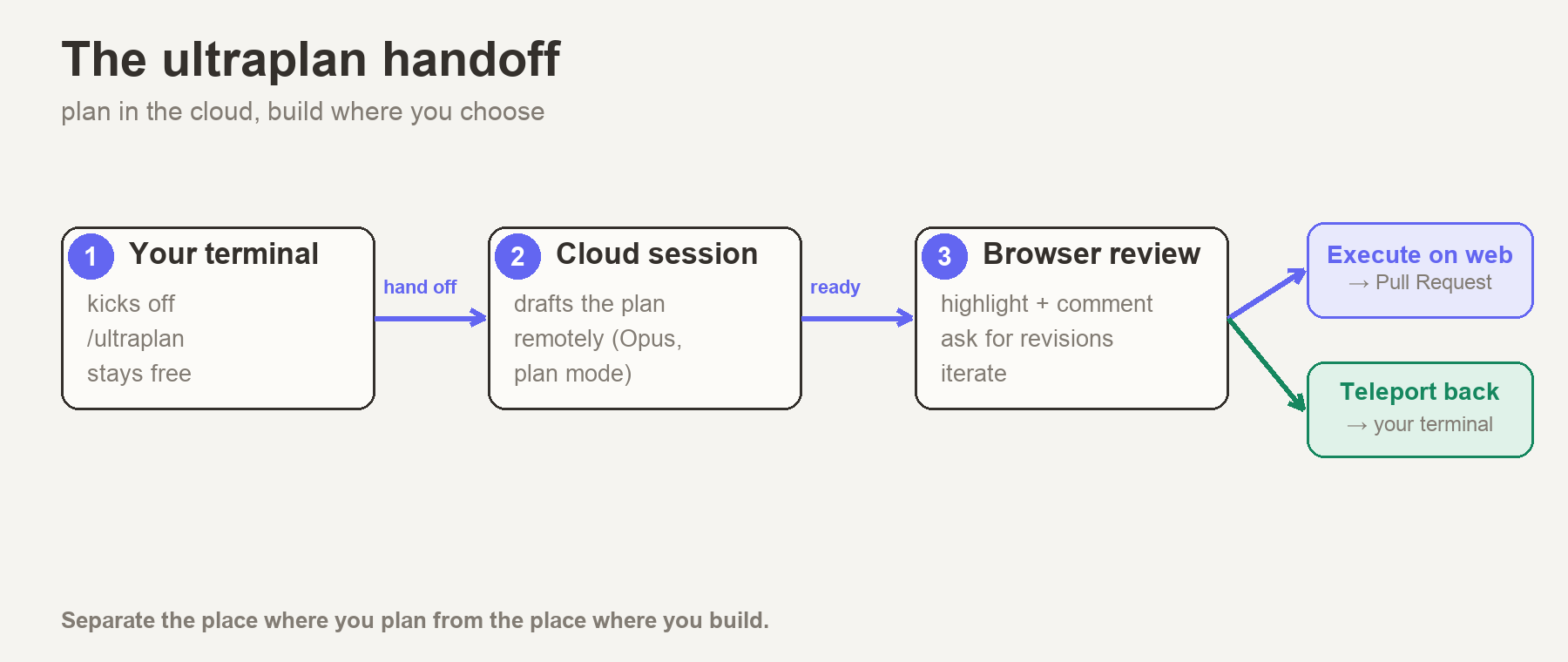
If I had to say it in a sentence: ultraplan is plan mode, except it runs in the cloud instead of on my laptop.
I kick off a planning task from my terminal like I normally would. But the thinking doesn't happen on my machine anymore. It gets handed off to a Claude session running on Anthropic's side, on what's apparently a heavier setup with a longer thinking window. My terminal stays free the whole time. When the plan's ready, I open it in the browser, read through it, leave comments, and then decide where it should actually run. Straight into a pull request from the cloud, or back down to my terminal where I've got my whole environment sitting right there.
That's pretty much the whole thing. Plan in one place, build in another.
Why it matters more than it first sounds
When I first read "planning runs in the cloud" I kind of shrugged. Sounded like a minor convenience. It took actually using it for a few days to get why it's more than that.
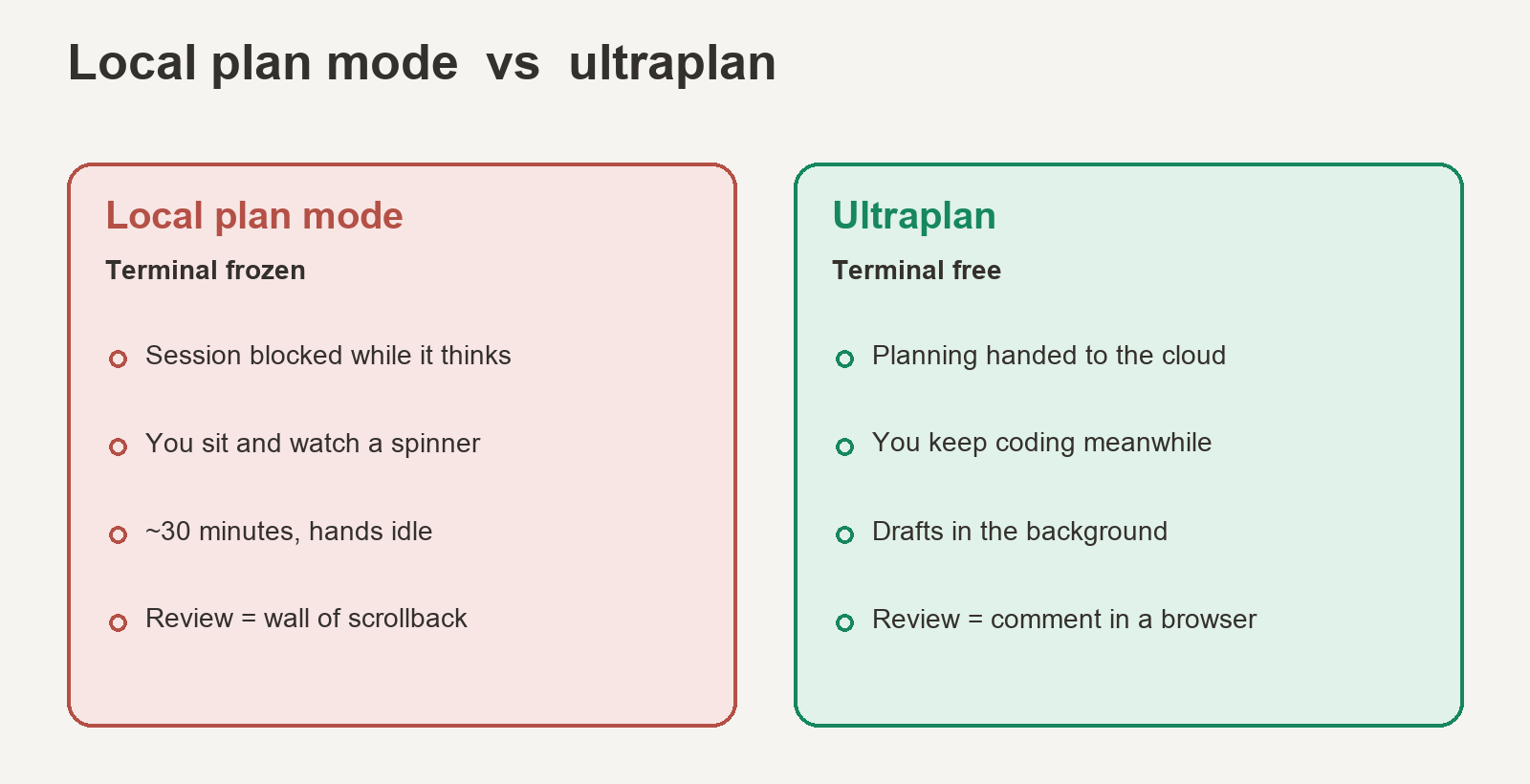
The obvious win is that my terminal stops being held hostage. Local plan mode just camps on your session. With ultraplan the work goes off somewhere else and I get my prompt back, so I can keep hacking on one thing while a plan for something else gets drafted in the background. That alone quietly changed how I work.
The part I didn't expect to care about: reviewing the plan in a browser. Locally, a plan shows up as one big wall of text and you sort of reply to all of it at once. In the browser I can grab one specific paragraph, say "no, don't drop that table yet," and comment on just that line. It feels a lot more like reviewing a PR than answering an email.
And then there's just the headroom. The cloud session isn't fighting my laptop for memory, so the big sprawling multi-file plans that used to make local plan mode run out of steam actually get room to breathe.
What you need before it'll work
A few things I wish I'd known going in, mostly because I tripped over a couple of them:
- A Claude Code on the web account
- Your project has to be a GitHub repo — the cloud session pulls it directly
- Claude Code v2.1.91 or newer (it's still a research preview)
- It does not run on Amazon Bedrock, Google Vertex AI, or Microsoft Foundry. It's Anthropic-cloud only.
One small relief: if you don't already have a cloud environment, ultraplan just spins one up for you the first time. No setup ritual to suffer through.
Three ways to start it
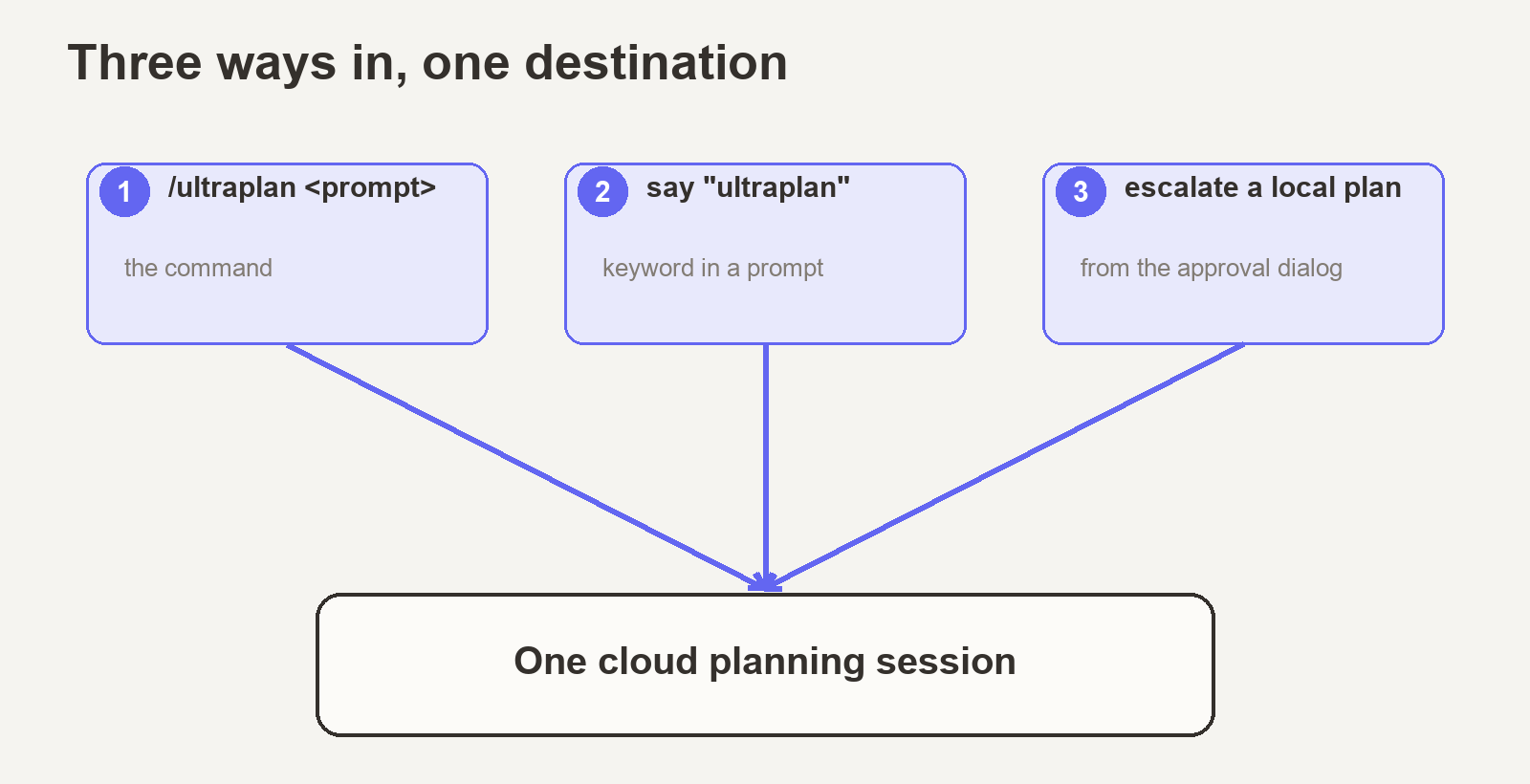
There isn't one "correct" way to trigger it. There are three, and they all end up in the same place.
# 1. The command — explicit and clean
/ultraplan migrate the auth service from sessions to JWTs

# 2. The keyword — just say the word in a normal prompt
"Can you ultraplan the move from REST to gRPC for our internal services?"

# 3. From a local plan — bump it up mid-flight
# Finish a normal plan, and at the approval dialog pick:
# "No, refine with Ultraplan on Claude Code on the web"
The first two ask for a quick confirmation before launching. The third doesn't, because choosing that option is the confirmation. Honestly I use the third one the most. I'll start planning something locally, realise halfway through that it's bigger than I thought, and just push it up to the cloud without losing the draft I already had.
The lifecycle, start to finish
This is the bit that made it click for me. Once you've watched the whole loop happen once, it stops feeling like magic and just becomes a tool you reach for without thinking.
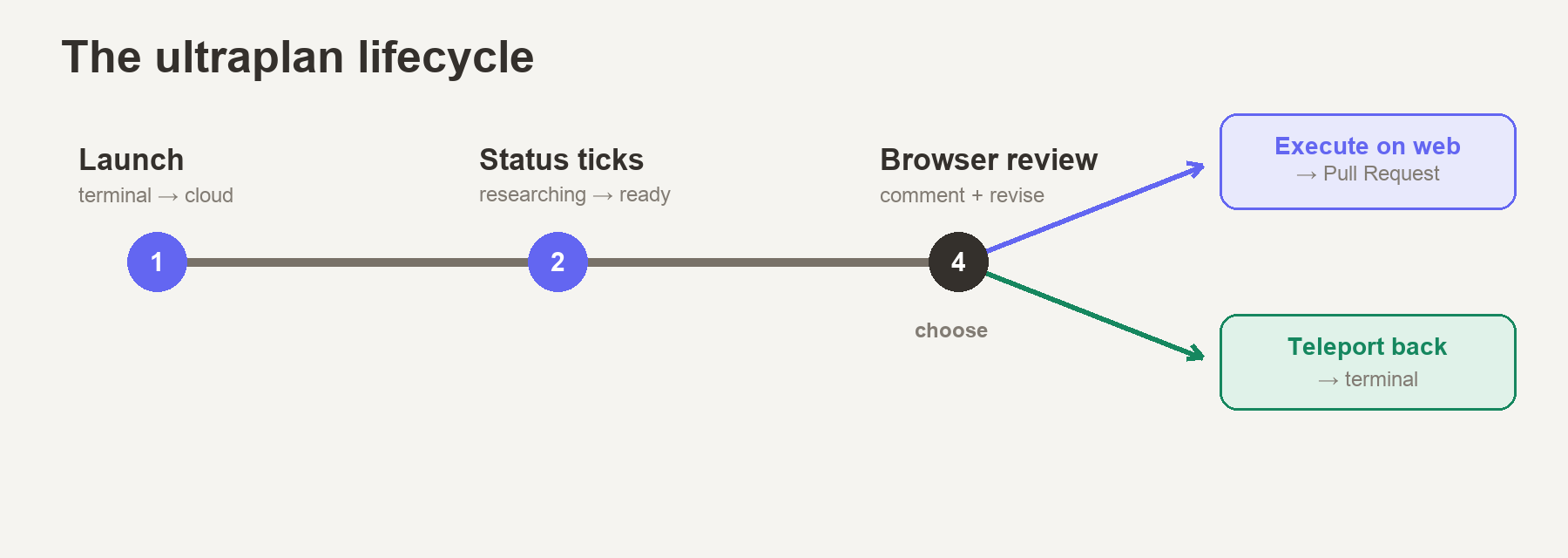
1. You fire it off. The cloud session spins up, reads your repo, and starts drafting in plan mode. Your terminal comes back to you almost immediately.
2. You get a tiny status line at your prompt instead of a frozen screen:
| Status | What it means |
| --- | --- |
| ◇ ultraplan | Reading your codebase, drafting the plan |
| ◇ ultraplan needs your input | It's got a question — open the link and answer |
| ◆ ultraplan ready | Plan's done. Go look at it. |
3. You review it in the browser. Highlight a passage, leave a comment, drop a reaction on a section you love or don't trust, jump around with the outline on the side. Tell it to address your comments and it revises and hands you a fresh draft. You can go back and forth as many times as you want.
4. You decide where it runs. This is the part I find genuinely clever, and it's what makes ultraplan more than "planning, but prettier."
The fork: cloud or terminal
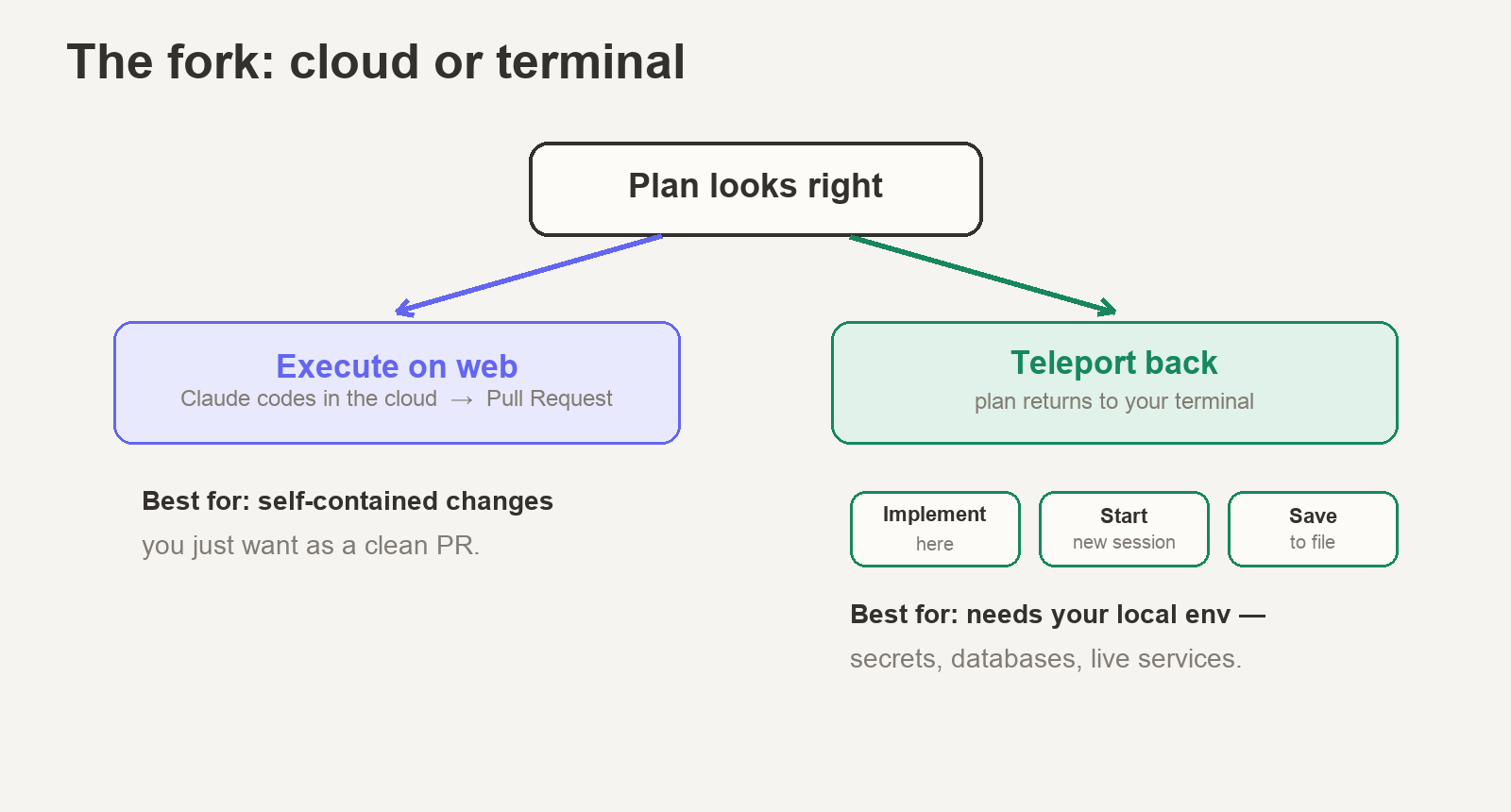
Once the plan looks right, you pick one of two ways to actually run it, straight from the browser.
Run it on the web. Claude implements the plan in that same cloud session, and when it's done you review the diff and open a pull request without your laptop ever getting involved. This is my go-to for self-contained changes I just want as a clean PR.
Send it back to the terminal. Claude pushes the approved plan back down to your waiting terminal and archives the cloud session so nothing keeps running behind your back. You get an "Ultraplan approved" dialog with three options:
- Implement here — drop the plan into your current conversation and carry on
- Start new session — wipe the slate and build with just the plan as context (it even prints a
claude --resumeso you can hop back to where you were) - Cancel — save the plan to a file and walk away; it tells you the path so you can come back later
I reach for "send it back" whenever the work actually needs my machine. A local database, secrets, some service it has to talk to. The cloud session can't see any of that. My laptop can.
Where it sits next to the other planning modes
Ultraplan isn't the only way Claude Code plans, and I don't reach for it every time. The way I line them up, smallest to biggest:
ultrathink— a keyword for deeper reasoning, local, inside a single answer. Good for gnarly logic.- Plan mode (
Shift+Tabtwice) — read-only, local, single agent. For exploring and planning one focused change. - Ultraplan (
/ultraplan) — cloud, terminal-free, review in the browser, then PR or teleport. For the big refactors and migrations.
My rough rule: if I can hold the whole change in my head, I just use local plan mode. If it's the kind of thing I'd want someone more senior to look over before a single line gets written, that's when ultraplan earns its place.
Where I'd be careful
It's still a research preview, so I'm assuming bits of this will shift around. It only works tied to the cloud and GitHub, so nothing offline and nothing on Bedrock, Vertex, or Foundry. And if you stop a session partway through, whatever it had drafted doesn't come back to your terminal. I found that one out the annoying way.
But the trade has been worth it for me. I give up a bit of control and a bit of setup, and I get my terminal back, a far nicer way to actually review a plan, and a model with enough room to think properly about something big.
The thing that stuck with me is smaller than the feature though. I'm just not babysitting the plan anymore. I say where I want to end up, hand it off, and go do something actually useful while the route gets worked out.
This is still new to me and it's a research preview, so take my read on it for what it is — one engineer's interpretation, written while the whole thing is still moving.